
Overview
The Client Check-In Webhook triggers when a client checks in for a general visit or a specific class session. This webhook provides real-time updates on check-ins, including details about the client, the session, and the status of the check-in, helping to manage client attendance and validate access.
Important note: Webhooks are currently only available for brand-level data (all locations).
Trigger Event:
-
Fired when a client checks in for a general visit or a specific class session.
Event Type:
-
checkIn
Payload Details:
-
clientID: Unique identifier for the client.
-
siteID: Identifier for the site where the check-in occurred.
-
checkInTime: Timestamp of the check-in.
-
firstName: Client’s first name.
-
lastName: Client’s last name.
-
email: Client’s email address.
-
phone: Client’s phone number.
-
barcode: Barcode associated with the client.
-
fobNumber: FOB number used for the check-in.
-
packageName: Name of the package associated with the check-in.
-
packageID: Unique identifier for the package.
-
checkInStatus: Status of the check-in (e.g., Valid, Invalid).
-
checkInMessage: Message associated with the check-in status.
-
sessionType: Type of the session (e.g., General Check-In).
-
sessionName: Name of the session (e.g., Jump Class).
-
sessionID: Unique identifier for the session.
-
sessionStartTime: Start time of the session.
-
SessionInstructor: First and last name of the session instructor.
-
customProperties: Additional custom fields relevant to the check-in.
Usage Example:
-
Automatically log client attendance for classes and general visits.
-
Ensure that clients only access services they are eligible for, based on their membership or package status.
-
Provide real-time data to session instructors about the attendees
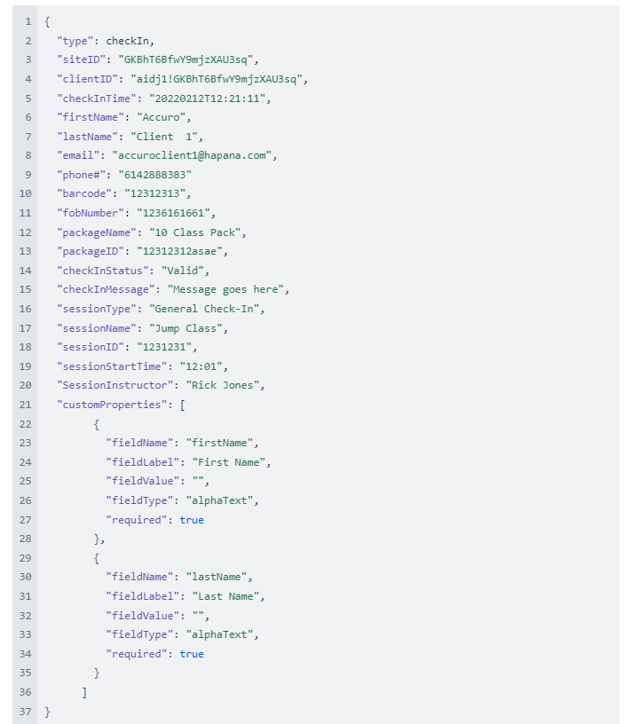
Payload response example:
Below is an example of the JSON payload that might be received when the Client Check-In Webhook is triggered:
Possible checkInStatus and checkInMessage Values:
-
Valid:
-
valid check-in
-
valid check-in - with alerts
-
-
Invalid:
-
invalid check-in - with alerts - Membership on hold
-
invalid check-in - no valid membership or booking
-
invalid check-in - Suspended membership
-
-
Error:
-
no record found
-