
Overview
The Birthday Report gives you a simple way to track upcoming member birthdays so you can recognize and engage clients at the right time.
It helps with planning promotions, personal outreach, and retention efforts, and now includes enhanced sorting, formatting, and a handy filter to help target active members.
How to Use the Birthday Report
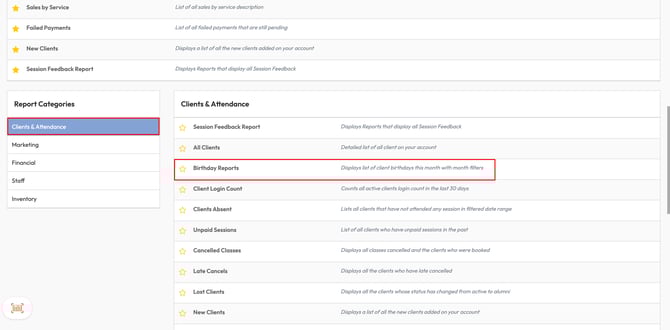
1. Access the Birthday Report
-
Click Reports
-
Select 'Clients & Attendance' in the Report Categories
-
Select Birthday Report
Tip: This report is perfect for planning birthday promotions and outreach campaigns.
2. Filter birthdays by month
-
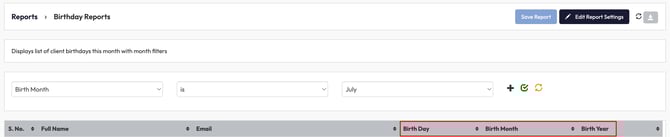
Use the filter at the top of the report to define your view
-
Select the Birth Month (e.g., July) to see clients with birthdays in that month.
Tip: Birthdays are sorted by month and day, making it easy to see upcoming birthdays at a glance.
3. View clear date formatting
-
Seperate columns for Month, Day, and Year improve readability and sorting options.
4. Filter by active credits (new enhancement)
-
Use the Active Credits filter dropdown
-
Choose:
-
Active to show members with active credits
-
Inactive to show those without active credits
-
-
Click the green Filter icon to apply the Active Credits filter

You’ll have an organized list of clients with birthdays coming up, with options to filter by month and target those with active credits for promotions. This can help drive retention and engagement efficiently.
Need help?
Reach out to our support team via support@hapana.com.