
This article shows you how to generate and review a payroll report in Core. Payroll reports provide a clear breakdown of staff earnings, session counts, and time clock entries across a date range. This helps you process payroll accurately, understand instructor performance, and ensure fair compensation based on attendance and session delivery.
Prerequisites-
Access to Core with permissions to view Reports.
-
Team members and payroll tiers already configured in the system.
Access the Payroll Report
1. Navigate to Reports
- Log in to Core
-
Click Reports from the Navigation bar
-
Within the Staff Report Category, select Payroll report
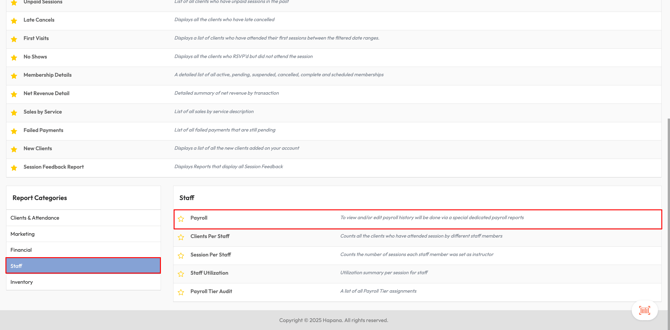
2. Apply Filters
-
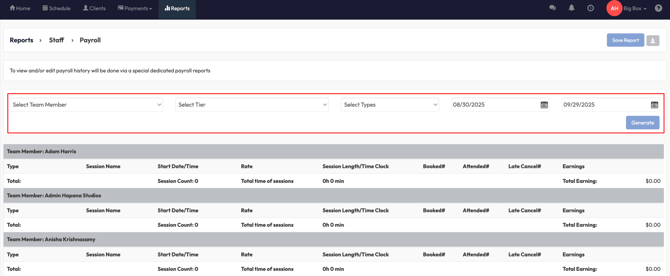
Use the dropdown menus to refine your report:
-
Select Team Member: choose one staff member or leave blank for all.
-
Select Tier: filter by payroll tier if applicable.
-
Select Types: include Session Types (classes and sessions) or Time Clock (admin/non-session time).
-
Date From / Date To: select your desired payroll period.
-
-
Click Generate.
3. Review Report Results
-
Each Team Member appears in a separate section.
-
The report shows:
-
Session Count
-
Total Hours (sessions and time clock)
-
Total Earnings
-
-
A detailed breakdown includes:
-
Type (session or time clock)
-
Session Name
-
Date/Time
-
Rate (flat rate, per-head, bonus)
-
Session Length
-
Booked / Attended / No-Show / Late Cancel Clients
-
Total Earnings
-
4. Export Data (Optional)
-
Click Save Report to save the configuration.
-
Download payroll data in CSV format for external processing or record keeping.
-
Reports can be displayed as detailed breakdowns or summarized by staff member.
Expected Outcome
You’ll have a payroll report showing accurate compensation details for your selected staff, services, and time period. This report can be used to process payroll, audit performance, or share with HR/finance teams.
Need more help? Reach out to our support team via support@hapana.com.